 |
|
|
|
Bezier splines are great for artists, but they have some interesting technical challenges. One is that they are parametric: rather than y = f(x) as we would like, they are { x = f(t), y = f(t) }. Among other things, this means they can easily go backwards in time:
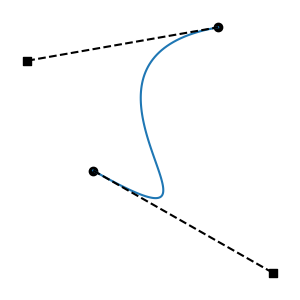
Such curves are non-functions: given a time, there is more than one possible value. This is intolerable for a system that governs values over time. We call these regressive segments. They are mathematically non-monotonic in the time dimension.
Artists probably don't create regressive curves on purpose. But they can certainly create them by accident. Splines can also be transformed, or generated programmatically, and this can lead to unusual cases.
Several different strategies have emerged for preventing regression. Ts splines take the following approach:
When addressing regression, we are only concerned with x(t), not with y(t). This means we only care about the placement of the control points in the time dimension. Anything can change in the value dimension, and what happens in the time dimension won't change at all. This is because x(t) and y(t) are separate functions. Changing values will squash, stretch, and skew the curve in the value dimension, but that doesn't matter for the question of regression.
We can also work in a normalized interval, scaled and translated so that the start knot is at time 0 and the end knot at time 1. This also has no effect on regression. The end result is that we care only about two numbers: the time coordinates of the knot tangent endpoints, expressed relative to the normalized interval.
If knot tangents don't leave the segment interval, we are guaranteed there is no regression. This is also intuitive for artists. It's a conservative rule you can learn: don't let a tangent cross the opposite knot, and you'll never get regression.
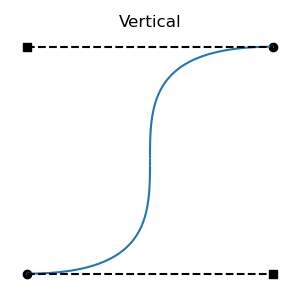
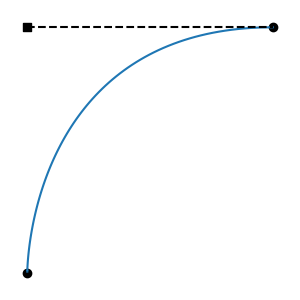
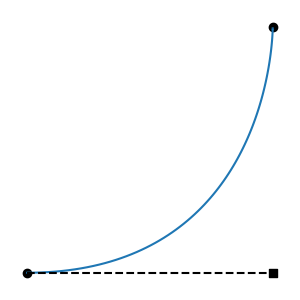
If both tangents alight exactly at the opposite knot, we get a single vertical, the limit of non-regression. (Throughout this document, we use "vertical" in the sense of "when graphed with time on the horizontal axis".)
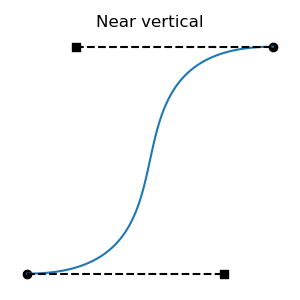
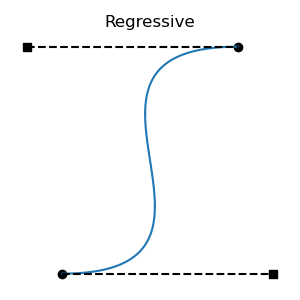
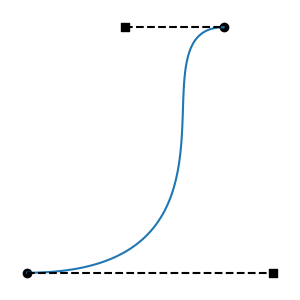
All regressive cases have at least one tangent outside the interval. Is the converse also true: that all cases with a tangent outside the interval are regressive? No: there are non-regressive curve shapes that can only be achieved by placing one of the tangent endpoints outside the interval. This can be non-regressive if the out-of-bounds tangent isn't too long, and the segment's other tangent is short enough. These cases are fairly atypical, involving regions of rapid change, but they are valid functions:
There's a graph that describes when regression arises:
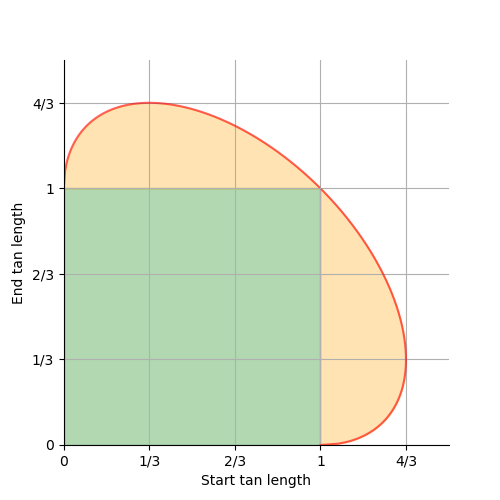
We've seen the (1, 1) point on the ellipse above; it's the symmetrical case with the vertical in the center of the interval. That one is also a corner of the green box, one of the limits of contained tangents.
Here are two additional important cases, the (1/3, 4/3) and (4/3, 1/3) ellipse limits. These are the longest possible non-regressive tangents. They put the vertical at times 1/9 and 8/9 respectively.
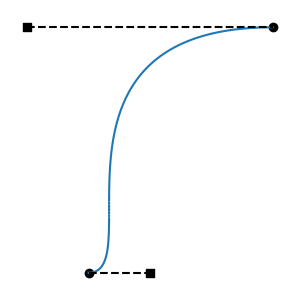
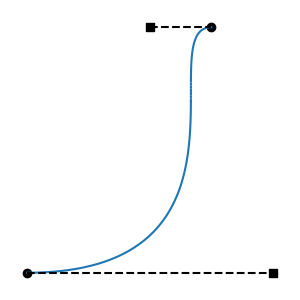
As we move between the above two limits, in the center of the ellipse edge, we make one tangent longer and the other shorter. As we move between the (4/3, 1/3) limits and the (1, 0) limits, at the fringes of the ellipse edge, we make both tangents longer or shorter.
At (0, 1) and (1, 0), we get a vertical at either endpoint. These are also at corners of the green square, and limits of contained tangents.
While reviewing the anti-regression strategies listed next, developers are encouraged to run regressDemo.py in the ts/script directory. This must be run by a Python interpreter than can import Ts, and either PySide6 or PySide2. Select a mode, then drag a tangent long, and watch the limiting behavior and the graph at the bottom.
First, most spline animation systems observe one important restriction, which Ts enforces as well: tangents may never face backwards, out of their segment's interval. Such a tangent will be ignored at runtime, as though it were zero-length. This prevents some of the worst cases. But, even when forced to face into their segments, tangents can cause regression by being too long.
Here are the anti-regression strategies that Ts supports:
Single-Tangent Strategies: shorten each tangent in isolation.
Dual-Tangent Strategies: for each spline segment, consider both tangents, and shorten one or both.
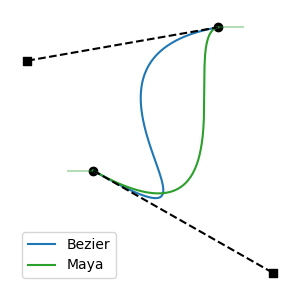
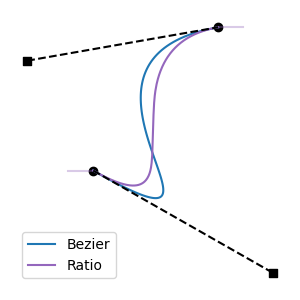
Interactive Strategies: as knots are interactively edited, clamp tangent lengths. Operate on both segments adjacent to the knot being edited. Handle edits to knot time, and edits to tangent length. These strategies only work during interactive edits, because they require differentiating between the knot being edited (the "active" knot) and the other knot in the segment (the "opposite" knot).
Disabling: If desired, regressive splines may be deliberately authored by selecting the None strategy. This will result in Keep Ratio behavior at evaluation time.
When the Limit Opposite mode is used, there are two slightly different behaviors:
regressDemo, the way this behavior looks in the tangent-length graph is that the point collides with the center of the edge of the ellipse, then slides down it.regressDemo, the way this behavior looks in the tangent-length graph is that the point collides with the fringe of the edge of the ellipse, and stops there.With Keep Start, manipulating the length of the start tangent (but not the end tangent; recall that Keep Start is asymmetrical) behaves similarly to Limit Opposite, as described above. However, in the fringe case, the opposite tangent will in fact be lengthened until the (4/3, 1/3) maximum is reached. This is for compatibility with Maya.
Anti-regression is performed in the following ways:
TsRegressionPreventer to filter edits.TsSpline's knots are changed, regression is avoided by shortening tangents, if needed. The only two methods that can introduce regression are SetKnot and SwapKnots.TsSpline::HasRegressiveTangents, UsdUtilsDoesLayerHaveRegressiveSplines, or UsdUtilsDoesStageHaveRegressiveSplines.TsSpline::AdjustRegressiveTangents.UsdUtilsAdjustRegressiveSplinesInLayer or UsdUtilsAdjustRegressiveSplinesOnStage.Ts always maintains a current authoring mode that affects all of the above operations, except for Runtime Limiting, which always uses Keep Ratio.
The (default) default anti-regression authoring mode is hard-coded to Keep Ratio. A different default may configured into the build:
build_usd.py: --default-anti-regression=TsAntiRegression...-DPXR_TS_DEFAULT_ANTI_REGRESSION_AUTHORING_MODE=TsAntiRegression...Clients may temporarily change the current authoring mode using TsAntiRegressionAuthoringSelector.
The Contain mode, unlike all others, is conservative: it disallows some non-regressive splines (those with "bold" tangents that exceed the segment interval).
When the current authoring mode is Contain, all anti-regression operations will behave as though bold tangents were regressive. For example, TsSpline::HasRegressiveTangents will return true for bold tangents, and edit limiting will clamp tangents to the segment interval when knots are changed.
If clients use Contain mode by default, but wish to avoid this conservative behavior in some contexts, they may use a TsAntiRegressionAuthoringSelector to query and limit in a non-conservative mode, such as Keep Ratio.
TsRegressionPreventer supports all values of TsAntiRegressionMode. It also supports Limit Active and Limit Opposite, which cannot be used in any other context, because they require differentiating a single knot that is being edited.
It make sense to use TsRegressionPreventer in the same default mode as all other anti-regression contexts. It can also make sense to use Limit Active or Limit Opposite with TsRegressionPreventer, despite the default mode being different. Maintainers of client code are encouraged to try regressDemo to see what feels best.
It is possible, using the bulk API in UsdUtils, to perform anti-regression at the time that spline content is loaded. Whether that is necessary depends on the client's situation.
Note that load-time anti-regression is similar to load-time spline reduction, in which splines that use features that the client does not support can be converted to similar splines that emulate those features. If clients need both reduction and anti-regression, they will typically do both at the same time.
 1.12.0