Overview
The UsdUI schema domain contains schemas for working with general user interface
related features. One use-case is using UsdUI for describing aspects of nodes in
graphs, such as configuring layout hints, node coloration, and so on.
UsdUI allows the user to describe where UI nodes are with NodeGraphNodeAPI,
add descriptive labels and groups to nodes with SceneGraphPrimAPI, and to
visually organize nodes with Backdrops.
Node graphs can be used to describe networks of prims, such as shading and material networks. Consumers such as DCC Tools can visualize node graphs and make complex networks easier to understand. Use the schemas provided by UsdUI to provide hints on how node graphs should be visualized.
Working With Node Graphs
The SceneGraphPrimAPI allows each node to contain a descriptive name
(ui:displayName) and a descriptive group (ui:displayGroup).
The NodeGraphNodeAPI defines how each node appears in the node graph.
This includes its position (ui:nodegraph:node:pos), color
(ui:nodegraph:node:displayColor), a link to documentation about the node
(ui:nodegraph:node:docURI), the amount of information the node currently
displays (ui:nodegraph:node:expansionState), an icon image to express the
node’s intent (ui:nodegraph:node:icon), its size (ui:nodegraph:node:size),
and its relative depth to other nodes in the graph
(ui:nodegraph:node:stackingOrder). The units for ui:nodegraph:node:pos
are not meant to be pixels but assume the typical node size is 1.0x1.0. For
ui:nodegraph:node:pos Y-positive is intended to be down. Positions are
relative to parent nodes, if any parent nodes exist.
Note
USD doesn’t provide any synchronization of node attributes such as
displayColor and pos with similarly named attributes from other schemas,
such as GPrim’s primvars:displayColor. It is up to the application
implementing how node elements are displayed to provide any sort of
automatic synchronization if desired.
Backdrops provide a way to visually group nodes and provide a useful
description for that group. Unlike SceneGraphPrimAPI.displayGroup,
backdrops are not directly associated with nodes. Visual size and position
of a backdrop is determined using NodeGraphNodeAPI properties.
As an example, presume that we have an application with a node graph that looks like this:
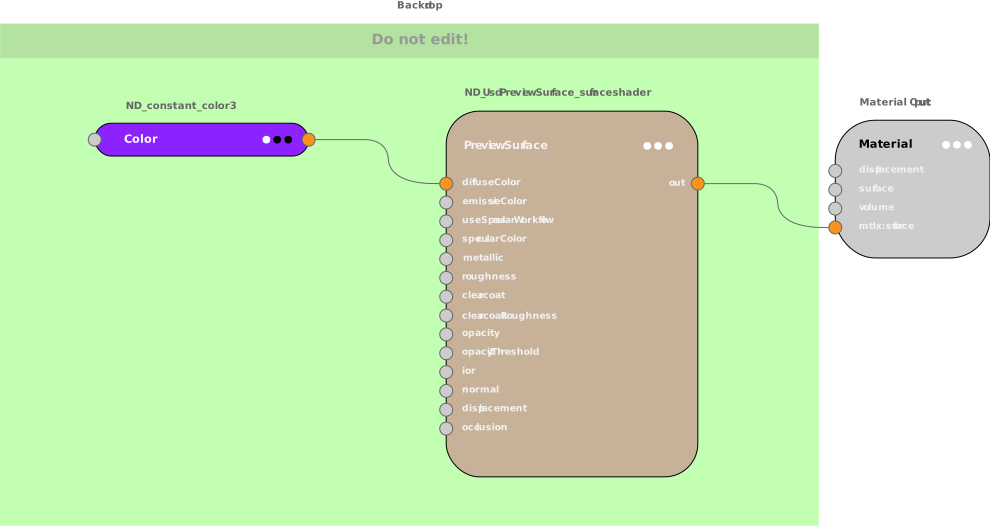
The node graph, including its user interface-related properties, can be represented in USD as follows:
def Material "Material"
{
    token outputs:mtlx:surface.connect = </World/Material/PreviewSurface.outputs:out>

    def Shader "PreviewSurface" (
        prepend apiSchemas = ["NodeGraphNodeAPI"]
    )
    {
        uniform token info:id = "ND_UsdPreviewSurface_surfaceshader"
        color3f inputs:diffuseColor.connect = </World/Material/Color.outputs:out>
        token outputs:out
        uniform color3f ui:nodegraph:node:displayColor = (0.780, 0.698, 0.6)
        uniform token ui:nodegraph:node:expansionState = "open"
        uniform float2 ui:nodegraph:node:pos = (-.85, 1.9)
    }

    def Shader "Color" (
        prepend apiSchemas = ["NodeGraphNodeAPI"]
    )
    {
        uniform token info:id = "ND_constant_color3"
        color3f inputs:value = (1, 0.023, 0.701)
        color3f outputs:out
        uniform color3f ui:nodegraph:node:displayColor = (0.549, 0.133, 1.0)
        uniform token ui:nodegraph:node:expansionState = "closed"
        uniform float2 ui:nodegraph:node:pos = (-2, 2)
    }

    def Backdrop "Backdrop" (
        prepend apiSchemas = ["NodeGraphNodeAPI"]
    )
    {
        uniform token ui:description = "Do not edit!"
        uniform color3f ui:nodegraph:node:displayColor = (0.764, 1.0, 0.698)
        uniform float2 ui:nodegraph:node:pos = (-0.8, 0.5)
        uniform float2 ui:nodegraph:node:size = (450, 330)
    }
}
While not all possible variations are shown above, the following can be observed:
ui:nodegraph:node:displayColorhelps distinguish nodes quicklyui:descriptionin Backdrop can provide context for regional groupings in a node graphui:nodegraph:node:expansionStatecontrols how much information a node displays, note the difference in detail betweenPreviewSurfacevsColorui:nodegraph:node:sizeandui:nodegraph:node:posdetermine the placement and relative positioning of nodes in a node graph.
Working With Accessibility Information
The AccessibilityAPI schema describes accessibility information on a Prim that
may be surfaced to a given runtime’s accessibility frameworks. This information
may be used by assistive features in tools, such as voice controls or screen
readers.
Accessibility information is provided as a standard triplet of label, description, and priority. This is a multiple apply schema, and so may have multiple namespaced accessibility triplets, where a instance name may reflect a given purpose for that triplet. The following simple example provides multiple triplets of accessibility information for a Prim.
def Mesh "Cube" (
    prepend apiSchemas = ["AccessibilityAPI"]
) {
    string accessibility:default:label = "Regular cube"
    string accessibility:default:description = "A plain featureless cube"
    token accessibility:default:priority = "standard"

    string accessibility:size:label = "Regular sized cube"
    string accessibility:size:description = "A 4-meter featureless cube"
    token accessibility:size:priority = "low"
}
Note that this schema will use “default” as an instance name if no namespace is specified.
See AccessibilityAPI for additional best practices for using this schema.