Performance Metrics
As of release 24.11, for each release, USD generates performance metrics using a specific set of assets and specific hardware and software configurations. This page describes what metrics are collected, what hardware and software configurations are used, the actual metrics results, and how to generate the metrics locally.
What We Measure
For a given asset, our performance script captures the following metrics by default (items in bold are reported on this page):
Time to load and configure USD plugins for usdview
Time to open the stage
Time to reset the usdview prim browser
Time to initialize the usdview UI
Time to render first image (in usdview)
Time to shutdown Hydra
Time to close the stage
Time to tear down the usdview UI
Total time to start and quit usdview
Time to traverse the prims in the stage
We run 100 iterations for each asset, and capture the minimum and maximum times for that set of iterations. We also calculate the mean time across the 100 iterations.
For each asset, we first warm the filesystem cache by loading the asset in usdview, to ensure we’re not including cache performance issues in our metrics.
All assets used to measure performance are assumed to be available locally. Time to download assets is not measured or included as part of the gathered performance metrics.
What Environment Is Used
This section describes the computing environment used to generate the published performance metrics. The following operating systems and hardware are currently used.
Note
Machine specifications are subject to change. If specifications do change for a give release, historical performance measurements will be run to backfill any outdated data.
Linux
OS: AlmaLinux 9
CPU: AMD EPYC 9654 96-Core Processor
CPU Utilization: 47 Core(s), 47 Logical Processor(s) (no hyperthreading)
RAM: 145GB
GPU: NVIDIA L40S-24Q
macOS
OS: macOS 14.3
CPU: Apple M2 Ultra (20 Core)
RAM: 192GB
GPU: Apple M2 Ultra GPU (76 Core)
Windows
OS: Microsoft Windows 11 Enterprise
CPU: AMD EPYC 7763 64-Core Processor, 2450 Mhz
CPU Utilization: 31 Core(s), 31 Logical Processor(s) (no hyperthreading)
RAM: 128GB
GPU: NVIDIA RTXA6000-24Q
USD Build
For each of the operating systems and hardware platforms listed previously, we
build USD with the same build configuration. We use a stock invocation of
build_usd.py with the default options (release build, Python components,
imaging and USD imaging components, usdview, etc). Note that this build uses
the default system memory allocator, and does not use an alternate allocator
(as described in Use an allocator optimized for multithreading).
Metrics
Metrics are all measured in seconds.
Performance Graphs Per Platform
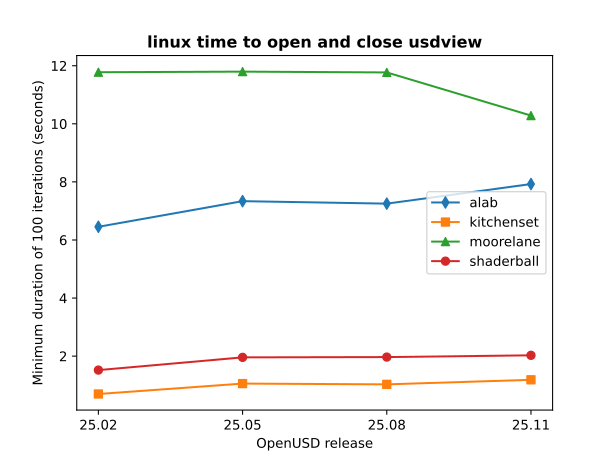
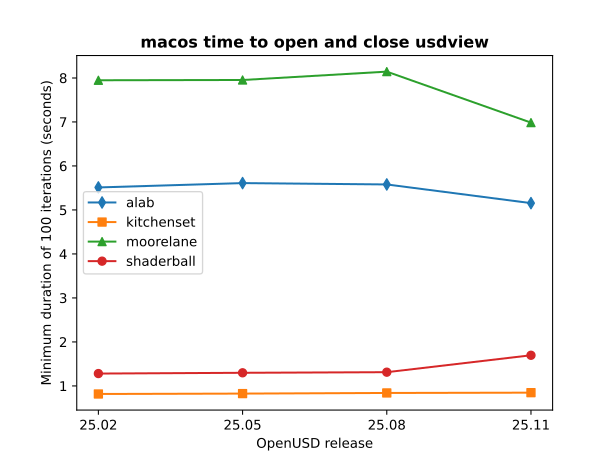
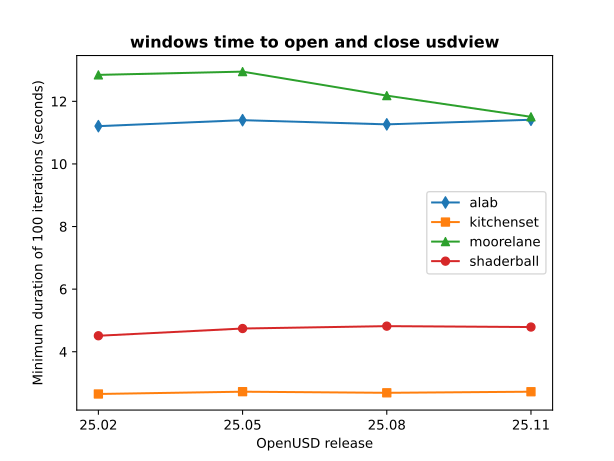
The following graphs show the time (in seconds) to open and close usdview for each asset. Graphs are provided for Linux, macOS, and Windows platforms (as described in What Environment Is Used). Performance data from the four most recent releases is reported on a rolling basis.
Note
A full historical rerun on linux was performed for the 26.03 release due to changes in machine configuration.
Interpret the metrics on this page with caution. Variation may arise from a variety of sources, including run-to-run inconsistency in how the GL driver schedules its flushes against our requests. Investigation on these is ongoing.
Standard Shader Ball
This asset is designed to be a comprehensive test of a broad array of material properties in a single render. Geometry is expressed using USD, materials are defined using MaterialX, texture maps are provided in OpenEXR format and encoded using the Academy Color Encoding System ACEScg color space.
In our performance sweep we use the mtlx_bubblegum material. Note the
image below may not exactly match the image generated during the performance
run; the primary intention is not necessarily to exercise specific renderers.

The shader ball asset can be downloaded here.
Metric |
25.11 |
26.03 |
26.05 |
26.08 |
|---|---|---|---|---|
Open stage |
min: 0.098586
max: 0.152453
mean: 0.1147789
|
min: 0.102143
max: 0.141323
mean: 0.12018247
|
min: 0.108347
max: 0.142785
mean: 0.12522259
|
min: 0.125322
max: 0.148907
mean: 0.13320966
|
Render first image |
min: 1.061915
max: 4.389524
mean: 1.11305927
|
min: 1.05858
max: 4.813072
mean: 1.11026738
|
min: 1.132672
max: 5.047174
mean: 1.18685452
|
min: 1.110248
max: 7.867876
mean: 1.19898046
|
Close stage |
min: 0.000612
max: 0.007621
mean: 0.0009525
|
min: 0.000585
max: 0.00771
mean: 0.00113363
|
min: 0.000627
max: 0.00862
mean: 0.00108197
|
min: 0.000657
max: 0.008608
mean: 0.00118314
|
Shut down Hydra |
min: 0.035256
max: 0.044038
mean: 0.03787955
|
min: 0.035166
max: 0.041641
mean: 0.03717791
|
min: 0.038391
max: 0.046654
mean: 0.04102367
|
min: 0.038988
max: 0.049061
mean: 0.04176199
|
Metric |
25.11 |
26.03 |
26.05 |
26.08 |
|---|---|---|---|---|
Open stage |
min: 0.096033
max: 0.106589
mean: 0.10036488
|
min: 0.124269
max: 0.135039
mean: 0.1273308
|
min: 0.12139
max: 0.129204
mean: 0.12521404
|
min: 0.13547
max: 0.146209
mean: 0.13819121
|
Render first image |
min: 1.088926
max: 1.434863
mean: 1.11545414
|
min: 0.743375
max: 1.198365
mean: 0.76448214
|
min: 0.787785
max: 1.314961
mean: 0.80603199
|
min: 0.407376
max: 0.898428
mean: 0.41666772
|
Close stage |
min: 0.000119
max: 0.000491
mean: 0.00016517
|
min: 0.000121
max: 0.000378
mean: 0.00017008
|
min: 0.000138
max: 0.000498
mean: 0.0001761
|
min: 0.000148
max: 0.000533
mean: 0.00018699
|
Shut down Hydra |
min: 0.012247
max: 0.020553
mean: 0.01637388
|
min: 0.012409
max: 0.020834
mean: 0.01706989
|
min: 0.012981
max: 0.022092
mean: 0.01737945
|
min: 0.009067
max: 0.015838
mean: 0.01351388
|
Metric |
25.11 |
26.03 |
26.05 |
26.08 |
|---|---|---|---|---|
Open stage |
min: 0.298701
max: 0.315642
mean: 0.30742671
|
min: 0.263552
max: 0.277434
mean: 0.27102602
|
min: 0.261372
max: 0.281605
mean: 0.27079815
|
min: 0.271862
max: 0.289156
mean: 0.28077484
|
Render first image |
min: 2.184459
max: 8.745092
mean: 2.3044740200000002
|
min: 2.140281
max: 2.4015
mean: 2.23789929
|
min: 2.275701
max: 8.259477
mean: 2.43007551
|
min: 2.215232
max: 13.666641
mean: 2.40498329
|
Close stage |
min: 0.000316
max: 0.001709
mean: 0.00068915
|
min: 0.00033
max: 0.000791
mean: 0.00044066
|
min: 0.000341
max: 0.000752
mean: 0.00045084
|
min: 0.000374
max: 0.000939
mean: 0.0004813
|
Shut down Hydra |
min: 0.060228
max: 0.069912
mean: 0.06285791
|
min: 0.06344
max: 0.071558
mean: 0.06660486
|
min: 0.069612
max: 0.07776
mean: 0.07274253
|
min: 0.06478
max: 0.074391
mean: 0.06826856
|
Kitchen Set
This asset provides a complex kitchen scene.

The Kitchen Set asset can be downloaded here.
Metric |
25.11 |
26.03 |
26.05 |
26.08 |
|---|---|---|---|---|
Open stage |
min: 0.043523
max: 0.08078
mean: 0.0529231
|
min: 0.048359
max: 0.090553
mean: 0.05856095
|
min: 0.047789
max: 0.076912
mean: 0.05592291
|
min: 0.052998
max: 0.08932
mean: 0.0620716
|
Render first image |
min: 0.218023
max: 0.233961
mean: 0.22471585
|
min: 0.217668
max: 0.243507
mean: 0.22705873
|
min: 0.218671
max: 0.237097
mean: 0.22637969
|
min: 0.232486
max: 0.265385
mean: 0.24223985
|
Close stage |
min: 0.008055
max: 0.020271
mean: 0.00992871
|
min: 0.008124
max: 0.021591
mean: 0.01004208
|
min: 0.008197
max: 0.02467
mean: 0.01009473
|
min: 0.008709
max: 0.025533
mean: 0.01088784
|
Shut down Hydra |
min: 0.034244
max: 0.040128
mean: 0.03604341
|
min: 0.033784
max: 0.038803
mean: 0.03593167
|
min: 0.030789
max: 0.0356
mean: 0.03314213
|
min: 0.028225
max: 0.032347
mean: 0.03045488
|
Metric |
25.11 |
26.03 |
26.05 |
26.08 |
|---|---|---|---|---|
Open stage |
min: 0.061154
max: 0.084453
mean: 0.0677701
|
min: 0.085585
max: 0.109018
mean: 0.09204828
|
min: 0.081513
max: 0.114839
mean: 0.0883299
|
min: 0.092551
max: 0.113511
mean: 0.10160631
|
Render first image |
min: 0.259431
max: 0.27281
mean: 0.26522798000000003
|
min: 0.259301
max: 0.273705
mean: 0.26457672
|
min: 0.261286
max: 0.274061
mean: 0.26642707
|
min: 0.254831
max: 0.315395
mean: 0.26072938
|
Close stage |
min: 0.002038
max: 0.003781
mean: 0.00244283
|
min: 0.002021
max: 0.003675
mean: 0.00247759
|
min: 0.001925
max: 0.00337
mean: 0.00238511
|
min: 0.002041
max: 0.003517
mean: 0.00242477
|
Shut down Hydra |
min: 0.017222
max: 0.02856
mean: 0.023692190000000002
|
min: 0.01651
max: 0.031314
mean: 0.02202539
|
min: 0.015542
max: 0.026238
mean: 0.02142616
|
min: 0.013821
max: 0.024521
mean: 0.02036446
|
Metric |
25.11 |
26.03 |
26.05 |
26.08 |
|---|---|---|---|---|
Open stage |
min: 0.105351
max: 0.120111
mean: 0.11219626
|
min: 0.10763
max: 0.123955
mean: 0.11461558
|
min: 0.099474
max: 0.116492
mean: 0.10618527
|
min: 0.108297
max: 0.124659
mean: 0.11513973
|
Render first image |
min: 0.387114
max: 0.430436
mean: 0.40021584
|
min: 0.387877
max: 0.417364
mean: 0.39946686
|
min: 0.385847
max: 0.415152
mean: 0.39539667
|
min: 0.387191
max: 0.417565
mean: 0.39784305
|
Close stage |
min: 0.01869
max: 0.028976
mean: 0.02328194
|
min: 0.019835
max: 0.032572
mean: 0.02471053
|
min: 0.018316
max: 0.029745
mean: 0.02298045
|
min: 0.018545
max: 0.028232
mean: 0.022193459999999998
|
Shut down Hydra |
min: 0.045518
max: 0.05392
mean: 0.049226980000000004
|
min: 0.045756
max: 0.054098
mean: 0.04928151
|
min: 0.041524
max: 0.04916
mean: 0.04623087
|
min: 0.03841
max: 0.046465
mean: 0.04293331
|
ALab
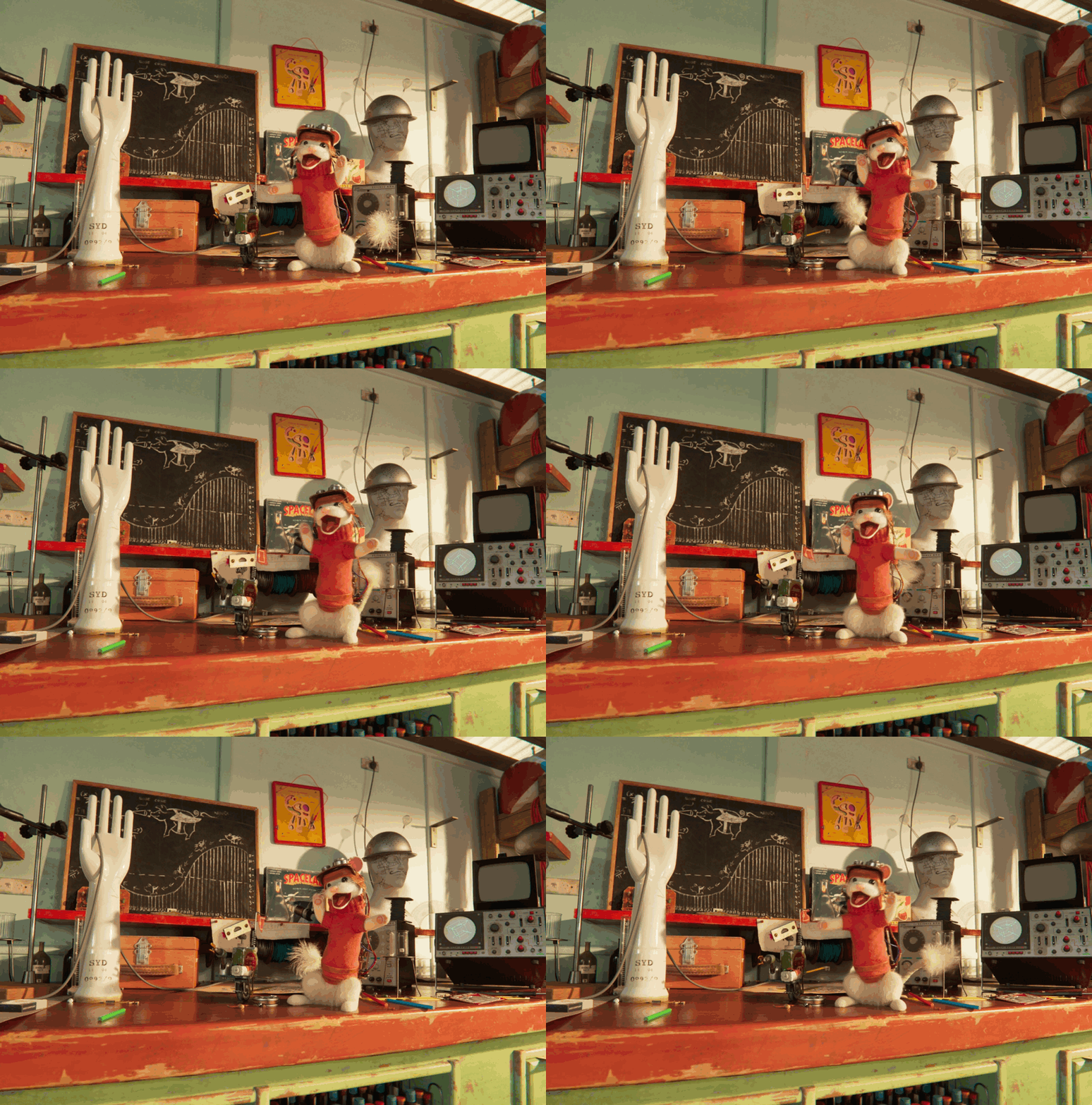
ALab is a full production scene created by Animal Logic and contains over 300 assets, complete with high-quality textures and two characters with looping animation in shot context. Supplied as four separate downloads: the full production scene, high-quality textures, shot cameras matching the ALab trailer, and baked procedural fur and fabric for the animated characters.
The metrics have been measured with the base asset merged with the additional “techvars” info.
The ALab asset can be downloaded here.
Metric |
25.11 |
26.03 |
26.05 |
26.08 |
|---|---|---|---|---|
Open stage |
min: 0.262824
max: 0.381295
mean: 0.3155681
|
min: 0.278403
max: 0.377748
mean: 0.3208941
|
min: 0.241601
max: 0.318423
mean: 0.27954225
|
min: 0.2802
max: 0.376605
mean: 0.32259145
|
Render first image |
min: 6.034976
max: 6.376652
mean: 6.20103818
|
min: 6.002758
max: 6.374273
mean: 6.17849757
|
min: 5.810938
max: 6.169416
mean: 5.93609673
|
min: 6.129386
max: 6.508681
mean: 6.31419199
|
Close stage |
min: 0.10802
max: 0.130206
mean: 0.11329438
|
min: 0.107958
max: 0.13805
mean: 0.11300532
|
min: 0.106509
max: 0.130405
mean: 0.1123268
|
min: 0.11729
max: 0.148149
mean: 0.12301499
|
Shut down Hydra |
min: 0.530892
max: 0.882976
mean: 0.65899259
|
min: 0.542178
max: 0.844146
mean: 0.65962838
|
min: 0.563382
max: 0.868353
mean: 0.70578134
|
min: 0.787496
max: 0.966843
mean: 0.8351985
|
Metric |
25.11 |
26.03 |
26.05 |
26.08 |
|---|---|---|---|---|
Open stage |
min: 0.387289
max: 0.476831
mean: 0.41920031
|
min: 0.401131
max: 0.479708
mean: 0.43101433
|
min: 0.374424
max: 0.477764
mean: 0.42913736
|
min: 0.314381
max: 0.548683
mean: 0.38178418
|
Render first image |
min: 3.374587
max: 3.796386
mean: 3.59016131
|
min: 3.247161
max: 3.697333
mean: 3.51718546
|
min: 3.196071
max: 3.900934
mean: 3.59978127
|
min: 3.225269
max: 4.021977
mean: 3.64870661
|
Close stage |
min: 0.032904
max: 0.046616
mean: 0.03683789
|
min: 0.03243
max: 0.044327
mean: 0.0365513
|
min: 0.032126
max: 0.050107
mean: 0.03739121
|
min: 0.027333
max: 0.037311
mean: 0.03149304
|
Shut down Hydra |
min: 0.142813
max: 0.177915
mean: 0.15281977
|
min: 0.135475
max: 0.170974
mean: 0.15313856
|
min: 0.140115
max: 0.166896
mean: 0.15124781
|
min: 0.132456
max: 0.161829
mean: 0.1425976
|
Metric |
25.11 |
26.03 |
26.05 |
26.08 |
|---|---|---|---|---|
Open stage |
min: 0.388077
max: 0.416403
mean: 0.4029927
|
min: 0.397166
max: 0.587801
mean: 0.41254627
|
min: 0.378314
max: 0.523401
mean: 0.39922649
|
min: 0.384181
max: 0.418874
mean: 0.40105012
|
Render first image |
min: 7.782884
max: 8.019821
mean: 7.89220199
|
min: 7.648056
max: 8.347713
mean: 7.87855149
|
min: 7.585018
max: 8.511921
mean: 7.9203183600000004
|
min: 7.882253
max: 8.234776
mean: 7.9930347
|
Close stage |
min: 0.317541
max: 0.405188
mean: 0.35938741
|
min: 0.340327
max: 0.432633
mean: 0.38996225
|
min: 0.317643
max: 0.496103
mean: 0.3783046
|
min: 0.340219
max: 0.401597
mean: 0.36910621
|
Shut down Hydra |
min: 0.329635
max: 0.572838
mean: 0.44994447
|
min: 0.351016
max: 0.632485
mean: 0.50048855
|
min: 0.377651
max: 0.643099
mean: 0.52348612
|
min: 0.349316
max: 0.618448
mean: 0.4948539
|
Moore Lane
4004 Moore Lane is a fully composed, high-quality scene for the purpose of testing various visual computing issues. The house itself was wrapped around a number of typical problem areas for light transport and noise sampling. This includes things like thin openings in exterior walls, recessed area light sources, deeply shadowed corners, and high-frequency details. The exterior landscape surrounding the house consisted of a relatively simple ecosystem of instanced plants which could provide some additional levels of complexity. In addition to the geometry itself being designed to exacerbate some typical issues, the USD structure itself was created for several layers of testing.
The metrics have been measured using the contained MooreLane_ASWF_0623.usda file.
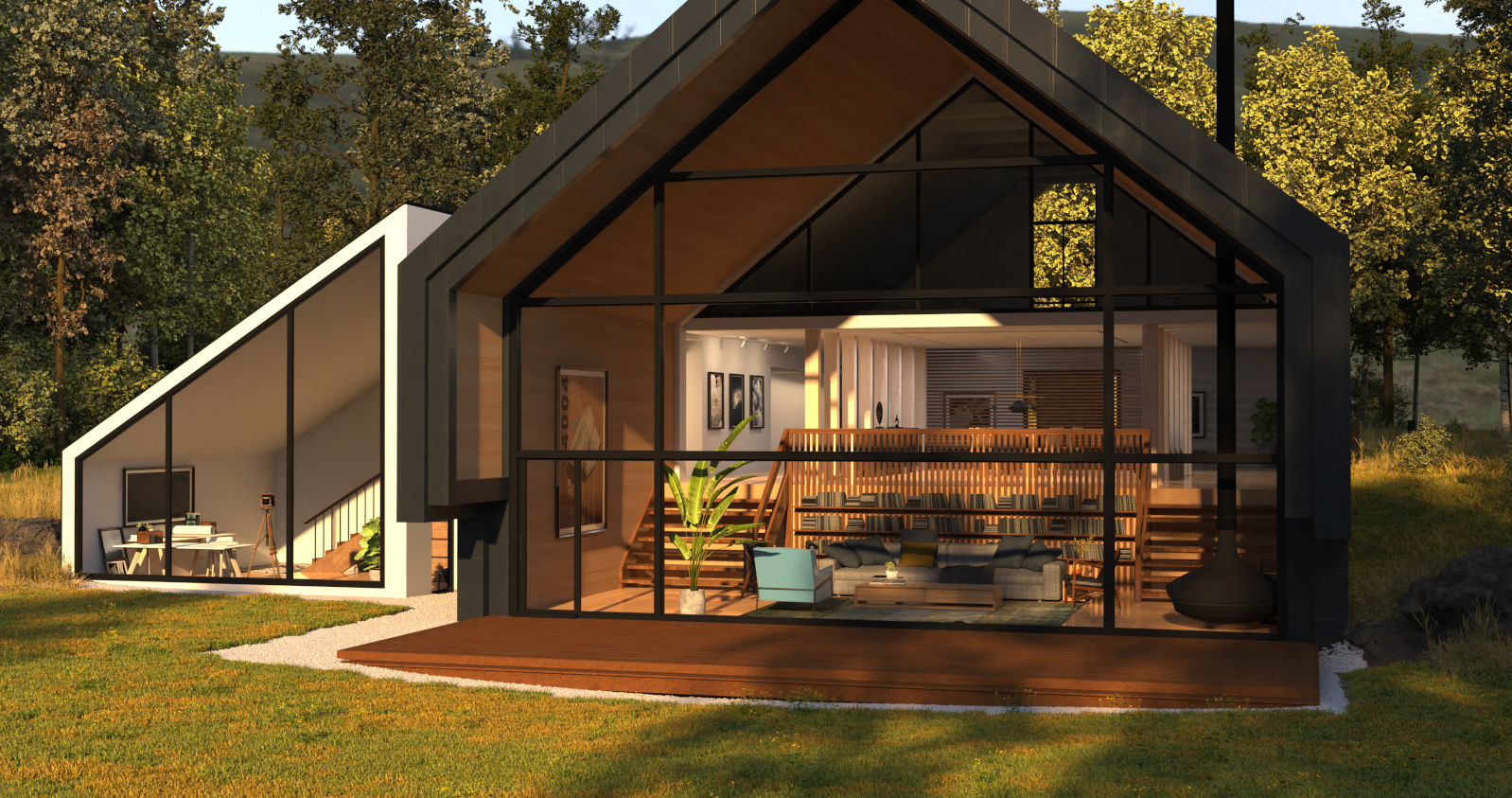
The Moore Lane asset can be downloaded here.
Metric |
25.11 |
26.03 |
26.05 |
26.08 |
|---|---|---|---|---|
Open stage |
min: 0.045243
max: 0.061459
mean: 0.04774144
|
min: 0.051093
max: 0.059576
mean: 0.05292827
|
min: 0.049433
max: 0.068931
mean: 0.05256769
|
min: 0.055556
max: 0.075718
mean: 0.05865626
|
Render first image |
min: 7.024242
max: 7.330487
mean: 7.1917083
|
min: 7.106522
max: 7.491846
mean: 7.30991904
|
min: 7.113698
max: 7.396277
mean: 7.21710089
|
min: 7.015587
max: 7.460851
mean: 7.29381541
|
Close stage |
min: 0.034029
max: 0.038338
mean: 0.03618818
|
min: 0.033988
max: 0.038964
mean: 0.03618142
|
min: 0.034322
max: 0.041997
mean: 0.03567777
|
min: 0.041617
max: 0.05171
mean: 0.04280516
|
Shut down Hydra |
min: 0.997761
max: 1.145262
mean: 1.0445001
|
min: 1.001618
max: 1.119256
mean: 1.04177241
|
min: 0.796864
max: 1.011868
mean: 0.83473395
|
min: 0.648444
max: 1.225414
mean: 0.99355296
|
Metric |
25.11 |
26.03 |
26.05 |
26.08 |
|---|---|---|---|---|
Open stage |
min: 0.0779
max: 0.083264
mean: 0.07919203
|
min: 0.103792
max: 0.115776
mean: 0.10550355
|
min: 0.098452
max: 0.103779
mean: 0.09996708
|
min: 0.107984
max: 0.113351
mean: 0.10950673
|
Render first image |
min: 4.928251
max: 5.818517
mean: 5.27123588
|
min: 4.825569
max: 5.729761
mean: 5.17014079
|
min: 4.78398
max: 5.725201
mean: 5.1418585
|
min: 4.742426
max: 5.715785
mean: 5.17064111
|
Close stage |
min: 0.003165
max: 0.008126
mean: 0.0034966899999999998
|
min: 0.003239
max: 0.007467
mean: 0.00347463
|
min: 0.003191
max: 0.008941
mean: 0.00384508
|
min: 0.003213
max: 0.008801
mean: 0.00360833
|
Shut down Hydra |
min: 0.121073
max: 0.137621
mean: 0.12819004
|
min: 0.121472
max: 0.188133
mean: 0.13085061
|
min: 0.104195
max: 0.171836
mean: 0.12383931
|
min: 0.119972
max: 0.163464
mean: 0.12754035
|
Metric |
25.11 |
26.03 |
26.05 |
26.08 |
|---|---|---|---|---|
Open stage |
min: 0.135837
max: 0.148618
mean: 0.14251247
|
min: 0.125819
max: 0.141703
mean: 0.1328517
|
min: 0.116097
max: 0.131661
mean: 0.12227848
|
min: 0.123235
max: 0.160999
mean: 0.13125285
|
Render first image |
min: 8.113206
max: 9.48835
mean: 8.81574719
|
min: 7.307756
max: 9.21315
mean: 8.49179167
|
min: 8.443403
max: 9.740621
mean: 9.20294465
|
min: 8.515424
max: 10.411091
mean: 9.12166075
|
Close stage |
min: 0.094986
max: 0.124853
mean: 0.10156746999999999
|
min: 0.096086
max: 0.127534
mean: 0.1035804
|
min: 0.095105
max: 0.121288
mean: 0.10279636
|
min: 0.095786
max: 0.13272
mean: 0.10288532
|
Shut down Hydra |
min: 0.321071
max: 0.470964
mean: 0.38557374
|
min: 0.354215
max: 0.457584
mean: 0.41048186
|
min: 0.349249
max: 0.474159
mean: 0.41690432
|
min: 0.349943
max: 0.460264
mean: 0.41932649
|
Running Performance Metrics Locally
We encourage developers to run the USD performance metrics to measure performance impacts of OpenUSD code contributions. Performance metrics can also be run to validate local runtime environments and hardware configurations.
Performance metrics are generating using the usdmeasureperformance.py
script found in pxr/extras/performance. See the
usdmeasureperformance tool docs for more
information on the different parameters available.
usdmeasureperformance.py uses usdview and testusdview, so you will need to make sure those are in your current path, or aliased properly.
For gathering the metrics published on this page, the following parameters are used (for each asset):
python usdmeasureperformance.py <asset.usda> -i 100 -a min -o <metrics output filename.yaml>
Optionally, –tracedir <dir> will output trace information to dir that may aid in performance debugging.
Adding Custom Metrics
You can add your own custom metrics and have usdmeasureperformance.py include them as part of the set of metrics that it measures.
To define a custom metric, create a script file that defines a
testUsdviewInputFunction() function that will be passed to testusdview.
For example, if you wanted to add a metric named “process prims”, that
traversed the stage and processed each prim in some way, you might have a
processPrimsMetric.py script that looks something like:
from pxr import Usd, UsdUtils, Usdviewq

def testUsdviewInputFunction(appController):
    with Usdviewq.Timer("process prims", True):
        stage = appController._dataModel.stage
        for prim in stage.Traverse():
            # process prim as needed, etc
See also the “traverse stage” example in pxr/extras/performance/explicitMetrics/stageTraversalMetric.py.
To include your custom metrics when running usdmeasureperformance.py,
add your metrics script name and metric name as part of the --custom-metrics
script parameter. For example, if you wanted to include the “process prims”
metric example for “MyTestAsset.usda”, you would use a
usdmeasureperformance.py command line similar to:
python usdmeasureperformance.py MyTestAsset.usda --custom-metrics processPrimsMetric.py:'process prims'
usdmeasureperformance.py will look for your custom metric script relative to the directory from which the usdmeasureperformance.py script is run.