DomeLight
An intrinsic light that emits light inwards from a very distant external environment, such as a sky, or a light environment captured in a High Dynamic Range (HDR) image used for Image Based Lighting (IBL).
Use DomeLights to simulate environment lighting.
The dome’s default orientation is such that its top pole is aligned with the world’s +Y axis. This adheres to the OpenEXR specification for latitude-longitude maps. From the OpenEXR documentation:
Latitude-Longitude Map:
The environment is projected onto the image using polar coordinates (latitude and longitude). A pixel’s x coordinate corresponds to its longitude, and the y coordinate corresponds to its latitude. Pixel (dataWindow.min.x, dataWindow.min.y) has latitude +pi/2 and longitude +pi; pixel (dataWindow.max.x, dataWindow.max.y) has latitude -pi/2 and longitude -pi.
In 3D space, latitudes -pi/2 and +pi/2 correspond to the negative and positive y direction. Latitude 0, longitude 0 points into positive z direction; and latitude 0, longitude pi/2 points into positive x direction.
The size of the data window should be 2*N by N pixels (width by height), where N can be any integer greater than 0.
See also the alternative DomeLight_1 version, which provides
additional control over the dome’s orientation via the poleAxis property.
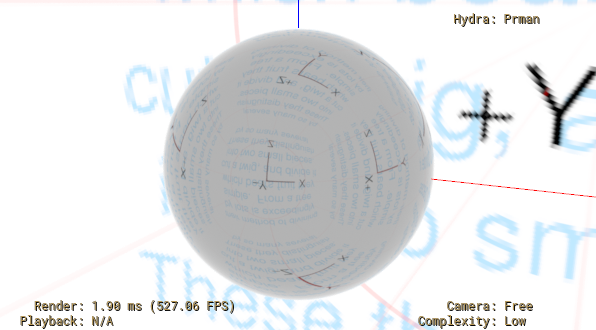
The following simple example uses a DomeLight with an environment map texture used to illuminate a sphere with a basic Material applied.
#usda 1.0
(
)

def Scope "Lights"
{
    def DomeLight "Dome"
    {
        asset inputs:texture:file = @orientationLatLong.tex@
    }
}

def Xform "TestGeom"
{
    def Sphere "Sphere1"
    (
       prepend apiSchemas = ["MaterialBindingAPI"]
    )
    {
        rel material:binding = </Material>
    }

}

def Material "Material"
{
    token outputs:ri:surface.connect = </Material/Surface.outputs:out>

    def Shader "Surface"
    {
        uniform token info:id = "PxrSurface"
        float inputs:diffuseGain = 0.3
        color3f inputs:specularEdgeColor = (1, 1, 1)
        color3f inputs:specularFaceColor = (0.4, 0.4, 0.4)
        float inputs:specularRoughness = 0.02
        token outputs:out
    }
}
Example RenderMan output for this layer:
Properties
guideRadius
USD type: float
Fallback value: 100000.0
Sets the radius of guide geometry used to
visualize the dome light, in USD units. The fallback value is 1.0e5, which
equates to 1 km for scenes whose metersPerUnit is the USD default of 0.01
(1 unit equals 1 cm).
inputs:texture:file
USD type: asset
The color texture (typically an HDR image intended for IBL) used by the DomeLight.
inputs:texture:format
USD type: token
Fallback value: automatic
The parameterization of the color texture. Valid values are:
automatic: The renderer will try to determine the layout from the file itself. For example, RenderMan texture files embed an explicit parameterization.
latlong: The file will be parameterized with latitude as X, longitude as Y.
mirroredBall: The file will be parameterized as an image of the environment reflected in a sphere, using an implicitly orthogonal projection.
angular: Similar to mirroredBall but the radial dimension is mapped linearly to the angle, providing better sampling at the edges.
cubeMapVerticalCross: The file will be parameterized as a cube map with faces laid out as a vertical cross.
light:shaderId
USD type: token
Fallback value: DomeLight
The shader ID for a DomeLight. USD will also register a Sdr shader node with a “DomeLight” identifier and the shading system “USD” to correspond to the light’s inputs.
portals
USD type: rel (relationship)
Optional portals to guide light sampling.
Inherited Properties (Xformable)
xformOpOrder
USD type: token[]
Inherited Properties (Imageable)
proxyPrim
USD type: rel (relationship)
purpose
USD type: token
Fallback value: default
visibility
USD type: token
Fallback value: inherited