Overview
The UsdMedia domain provides ways to associate various forms of media, such as
audio (SpatialAudio) or thumbnails (AssetPreviewsAPI) with assets.
Working With Media
SpatialAudio allows for ambient audio playback or audio playback from a
specific location. It also allows setting various playback options.
AssetsPreviewsAPI allows for setting one or more thumbnails for an asset.
The thumbnails could be pre-rendered images of the asset that could be
presented in the asset browser of a DCC tool, or in a system asset browser.
The following example, assetPreviewsApi.usda, uses both of these schemas.
#usda 1.0
(
    defaultPrim = "World"
    endTimeCode = 2400
    startTimeCode = 0
    timeCodesPerSecond = 24
)

def Xform "World"(
    prepend apiSchemas = ["AssetPreviewsAPI"]
    assetInfo = {
        dictionary previews = {
            dictionary thumbnails = {
                dictionary default = {
                    asset defaultImage = @defaultThumbnail.jpg@
                }
            }
        }
    }
)
{
    def Cube "Cube"
    {
        double3 xformOp:translate = (1, 5, -2)
        uniform token[] xformOpOrder = ["xformOp:translate"]

        def SpatialAudio "Speech"
        {
            uniform token auralMode = "spatial"
            uniform timecode endTime = 480
            uniform asset filePath = @mySpeech.mp3@
            uniform token playbackMode = "onceFromStartToEnd"
            uniform timecode startTime = 240
        }
    }

    def SpatialAudio "Ambient"
    {
        uniform token auralMode = "nonSpatial"
        uniform asset filePath = @myAmbientTrack.mp3@
        uniform token playbackMode = "loopFromStage"
    }
}
The following can be observed from the example above:
The difference between using spatially played audio in
Speechand nonSpatial audio inAmbientThe way thumbnails are associated with assets, and how they can be utilized.
The way
Speechis nested under theCubegprim, in case the gprim is ever moved or animated.
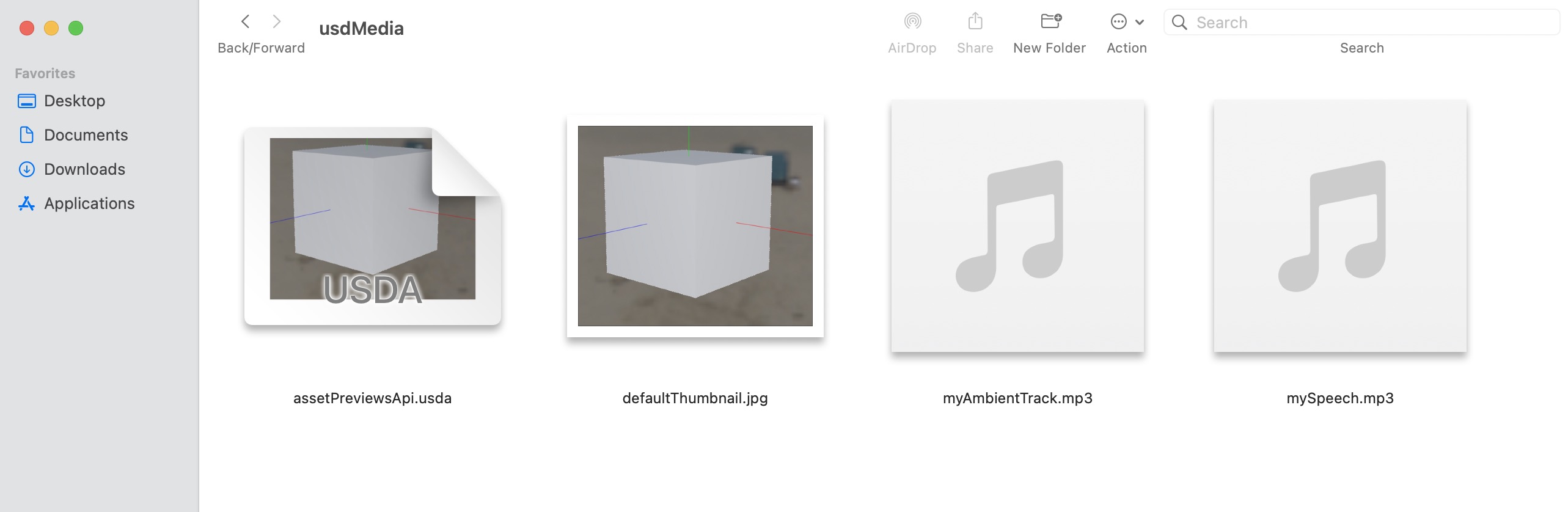
As an example of how the thumbnail information might be presented, the
following macOS screenshot shows assetPreviewsApi.usda in the Finder file
browser. Notice how Finder is using defaultThumbnail.jpg in the
file icon for assetPreviewsApi.usda.