Imageable
The Imageable schema is the base class for all prims that can be rendered or displayed in a 3D scene. It provides common properties for controlling visibility and purpose, which determine how geometry should be included in rendering and other computations.
Visibility Control
Imageable’s visibility attribute can be used to manage which prims are visible
in renders and viewports. Visibility can be animated, allowing geometry to
appear or disappear over time. Visibility is strongly inherited down the
namespace.
This example uses the visibility attribute to control prim visibility, which changes over time based on TimeSamples.
#usda 1.0
(
    startTimeCode = 1
    endTimeCode = 48
    timeCodesPerSecond = 24
)
def Plane "AnimatedVisibility"
{
    token visibility.timeSamples = {
        0: "inherited",
        24: "invisible",
        48: "inherited"
    }
}
See also Using the Visibility Attribute.
Purpose Classification
Imageable provides the purpose attribute used for organizing geometry into
imageable purpose categories (render, proxy, guide, default), which can be used
to filter and in some workflows optimize renderer output. Purpose can also be
used to link high-detail render geometry to lightweight proxy representations.
Purpose is inherited down the scene namespace. If a prim is not imageable or does not have an authored opinion about its own purpose, then it will inherit the purpose of the closest imageable ancestor with an authored purpose opinion.
See also Using Imageable Purpose.
Purpose Examples
Guide Geometry
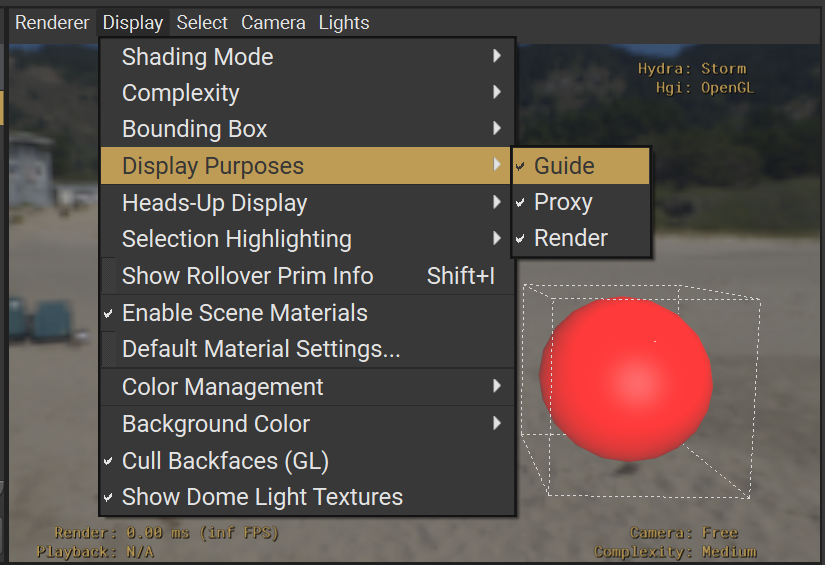
The following example sets the imageable purpose of a Sphere to “guide”. The usdview screenshot shows the Sphere rendered when “guide” purpose is enabled in the UI.
#usda 1.0

def Sphere "GuideSphere"
{
    double radius = 3.0
    float3[] extent = [(-3, -3, -3), (3, 3, 3)]
    token purpose = "guide"
    color3f[] primvars:displayColor = [(1.0, 0.0, 0.0)] (
        interpolation = "constant"
    )
}
Proxy representation
This example uses the proxyPrim relationship and imageable purpose to
specify proxy geometry to use for a Mesh.
#usda 1.0

def Mesh "HighDetailMesh"
{
    token purpose = "render"
    rel proxyPrim = </ProxySphere>
    # ... mesh data ...
}

def Sphere "ProxySphere"
{
    token purpose = "proxy"
    double radius = 1.0
}
See also Using Purpose for Stand-in Data, and Working with Primitives and Meshes for an additional example using the proxy purpose.
Purpose Inherited Down the Namespace
In the following example, /Parent is imageable and has an authored imageable purpose of “render”. /Parent/Child1 is also imageable and has an authored purpose of “proxy”. /Parent/Child2 is also imageable but has no authored purpose, so its effective purpose is “render”, inherited from the authored purpose of /Parent.
#usda 1.0

def Xform "Parent"
{
    token purpose = "render"

    def Xform "Child1"
    {
        token purpose = "proxy"
    }

    def Xform "Child2"
    {
        # imageable but no purpose authored, inherits parent purpose
    }
}
See also Purpose Inheritance.
Imageable Best Practices
Visibility:
Use “inherited” for normal visibility behavior, and “invisible” to hide prims and their children.
Remember that invisible prims are still active and available for inspection and authoring.
Remember that visibility is strongly inherited down the namespace, so child prims of a prim set as invisible cannot be switched to visible
Purpose:
Use “default” for general-purpose geometry
Use “render” for final quality geometry
Use “proxy” for lightweight interactive representations
Use “guide” for helper/visualization geometry
Understand how purpose is inherited down the namespace
Proxy Relationships:
Only create proxyPrim relationships on prims with
purpose="render"Use proxyPrim to link render geometry to its proxy representation
Performance:
Use purpose filtering to optimize rendering performance for particular workflows
Consider using proxy representations for complex scenes
Properties
proxyPrim
USD type: rel (relationship)
The proxyPrim relationship allows linking a prim
whose purpose is “render” to its (single target) purpose="proxy" prim.
This is useful for providing a less complex proxy geometry representation of a
prim optimized for interactive renders.
Typically you would author proxyPrim for prims whose purpose is “render”, although this is not required for render and proxy prims to draw properly in the appropriate circumstances. Rather, it is for users and DCC’s to reason more easily about the different representations.
See also Using Purpose for Stand-in Data.
purpose
USD type: token
Fallback value: default
Purpose classifies geometry into categories that can each be independently included or excluded from different operations, such as rendering or bounding-box computation.
Allowed values:
“default”: No special purpose, included in all traversals. This is the fallback value if a purpose has not been authored.
“render”: For final quality renders.
“proxy”: For lightweight interactive renders. For example, the prim might be a lower-complexity representation of a mesh for rendering in a DCC tool.
“guide”: For helper/visualization geometry. For example, the prim might be a spline used as a visual aid in a rigging tool.
Purpose is inherited down the scene namespace. If a prim is not imageable or does not have an authored opinion about its own purpose, then it will inherit the purpose of the closest imageable ancestor with an authored purpose opinion (or use the fallback purpose if no ancestor has an authored purpose).
See also Using Imageable Purpose.
visibility
USD type: token
Fallback value: inherited
Visibility is the simplest way to control whether geometry is shown or hidden. It can be animated, allowing a sub-tree of geometry to appear and disappear over time. Unlike deactivating geometry, invisible geometry is still available for inspection, positioning, and computing against. Note that visibility is strongly inherited down the namespace, so child prims of a prim set as invisible cannot be switched to visible.
Allowed values:
“inherited” (the fallback value): Inherits visibility from parent prims
“invisible”: Hides the prim and all its children from rendering
See also Using the Visibility Attribute.